Step-by-step withdrawal instructions for Hellcase, DatDrop, and CSGOFast. Fix pending issues and avoid Steam trade holds.
Most trusted CS2 case sites process withdrawals within 10-15 minutes. However, Steam's 7-day trade hold can delay skins appearing in your inventory. The key to instant withdrawals is having Steam Guard Mobile Authenticator enabled for at least 7 days on your account.
Before you deposit on any case site, make sure it's legitimate — run through our CS2 scam safety checklist first.
After winning skins, go to your Hellcase inventory page. Select the skins you want to withdraw.
Click the Withdraw button. Hellcase will send a trade offer to your Steam account via your Trade URL.
Open Steam → go to Trade Offers → accept the incoming trade from Hellcase's bot. If you have Steam Guard Mobile, the skins appear in your inventory instantly.
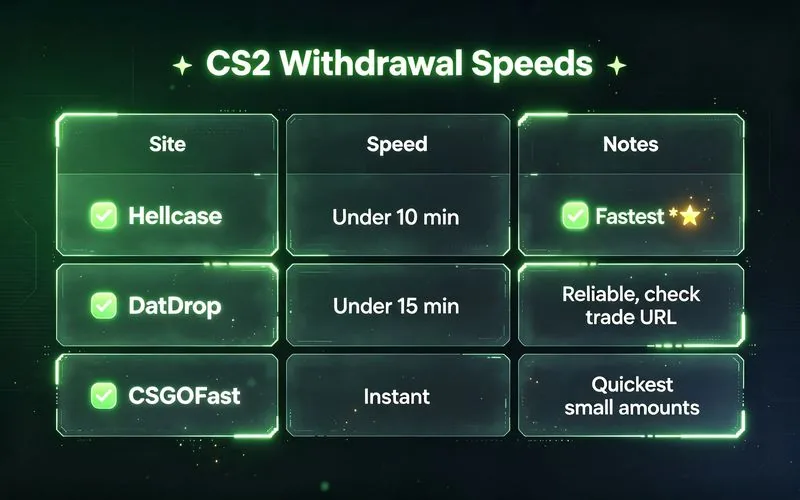
⏱️ Typical withdrawal time: Under 10 minutes. One of the fastest in the industry, rated 4.8/5 on Trustpilot.
Withdraw Instantly on Hellcase →
Go to your DatDrop profile → click the Withdrawals tab. Select the skins you want to cash out.
Make sure your Steam Trade URL is correctly set in DatDrop settings. This is the #1 cause of failed withdrawals.
Accept the trade offer on Steam. Skins arrive in your inventory shortly after.
⏱️ Typical withdrawal time: Under 15 minutes.
Click Withdraw in the CSGOFast menu. Select items from your site inventory.
CSGOFast sends a trade offer instantly. Accept on Steam and skins appear in your inventory.
⏱️ Typical withdrawal time: Instant for most users. Not sure which cases to open first? See our best CS2 cases ranked by ROI.
| Site | Withdrawal Time | Notes |
|---|---|---|
| Hellcase | <10 min | Fastest overall, 5M+ users |
| DatDrop | <15 min | Reliable, check trade URL |
| CSGOFast | Instant | Quickest for small amounts |
Need the full walkthrough for a specific site? Our directory covers every CS2 case site we've tested:
Fix: Check your Steam Trade URL is correct. Go to Steam → Inventory → Trade Offers → "Who can send me trade offers?" → copy your Trade URL → paste it in the site's settings. If the URL has expired, generate a new one.
Fix: Make sure your Steam profile is Public. Go to Steam → Edit Profile → Privacy Settings → set to Public. Also ensure the site hasn't hit its daily withdrawal limit — some sites cap high-value withdrawals.
Fix: You need Steam Guard Mobile Authenticator enabled for at least 7 days. Download the Steam Mobile App, enable the authenticator, and wait 7 days. There is no way to bypass this — it's Valve's security policy.
Fix: Some sites require KYC for large withdrawals (usually $1,000+). This is a one-time verification. For smaller amounts, trusted sites like Hellcase process withdrawals without ID checks.
Hellcase processes withdrawals in under 10 minutes. DatDrop takes under 15 minutes. CSGOFast offers instant withdrawals. However, Steam's 7-day trade hold may delay the skin appearing in your inventory if you don't have Steam Guard Mobile Authenticator.
Common reasons: no Steam Guard Mobile Authenticator (causes 7-day hold), wrong trade URL, site maintenance, or failed identity verification for large amounts. Check your Steam trade URL and authenticator status first. The r/GlobalOffensive community has threads on common withdrawal issues.
Enable Steam Guard Mobile Authenticator on your phone for at least 7 days. Use the same Steam account consistently. Make sure your profile is public and your trade URL is correctly entered on the case site. If you're withdrawing a knife, check its value first in our knife guide.
Three things: enable Steam Guard Mobile Authenticator (avoids the 7-day hold), keep your Steam Trade URL current, and use a fast site — Hellcase clears in under 10 minutes. Fixing a wrong Trade URL is the #1 speed improvement.
You withdraw skins, not cash, on most case sites. Those skins are then sold for real money on the Steam Community Market or third-party marketplaces. Some sites do offer crypto or bank payouts for larger amounts.
It varies by site — most allow small withdrawals of a few dollars. High-value withdrawals (roughly $1,000+) may trigger one-time ID verification. Check each site's terms before depositing.
Large withdrawals trigger KYC (know-your-customer) checks for anti-fraud compliance. It's a one-time step and is standard on legit sites. Small withdrawals on trusted sites like Hellcase typically need no ID.
Yes. Without Steam Guard Mobile Authenticator, Steam enforces a 7-day trade hold on every trade — a Valve rule, not the site's. Enable it at least 7 days before your first withdrawal. Our scam safety guide covers how to verify a site before you link your Steam account.
 ▶
▶
Subscribe for more CS2 guides →
🔥 Scan bid/ask spreads every 10min • A+ rated signals • $49 Beta
🤖 Get the Bot — $49